✨ New in FlexiFunnels · Affiliate Management

Run Your Own Affiliate Program, Right Inside FlexiFunnels

Let hundreds of people sell your products for you. Set commissions, track every referral, credit the right affiliate and record every payout, in the same account that already runs your pages, checkout and courses.
Built into your checkoutNothing to install or connectA dashboard for every affiliateWorks through the FlexiFunnels MCP
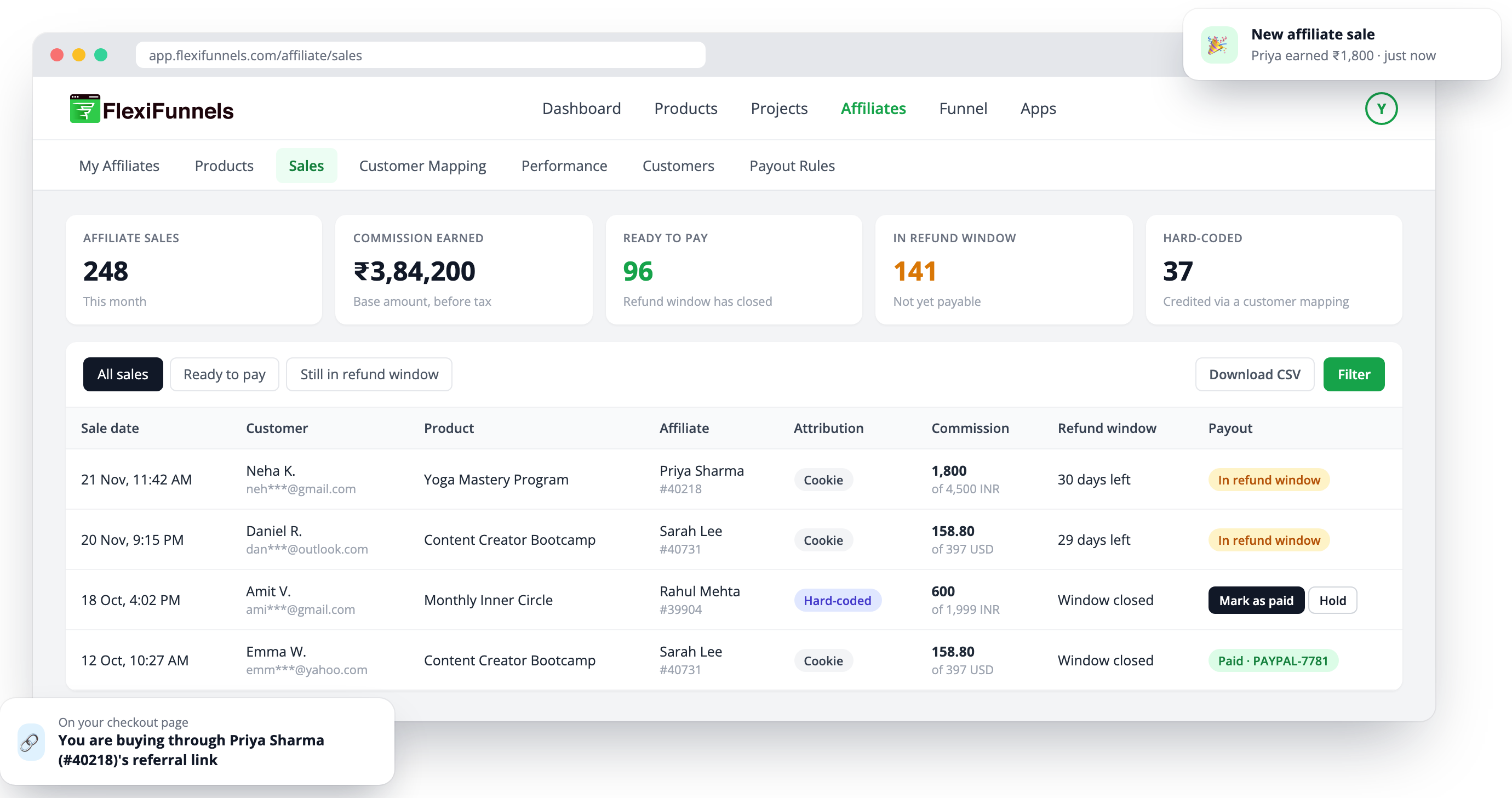
FlexiFunnels Affiliates, Sales screen: every affiliate sale with commission, refund window and payout status
3rules to decide who gets the credit
7tabs to run every affiliate in one place
1-tapRefer & Earn for course and community buyers
₹ $ +commissions kept per currency
What's inside

Everything an affiliate program needs, in one place

Switch it on for any product. Here is what you get.

How it works

Set up your program in three steps

No code and no plugins. Your FlexiFunnels checkout already tracks every affiliate sale.

Switch it on for a product

Open a product, go to Affiliates, tick "Setup your Affiliate" and set the commission, the attribution rule and the refund window.

Add your affiliates

Share the product's sign-up link, add affiliates yourself, or let your buyers join from their member area. Approve each one, or approve automatically.

Track sales and record payouts

Every sale shows the affiliate, the commission and the date it becomes payable. Pay your affiliate, mark it paid, and they see it in their dashboard.

The features

A closer look at Affiliate Management

Commissions

Set what affiliates earn, product by product

Each product has its own commission settings, so your front-end offer and your high-ticket program can pay differently.
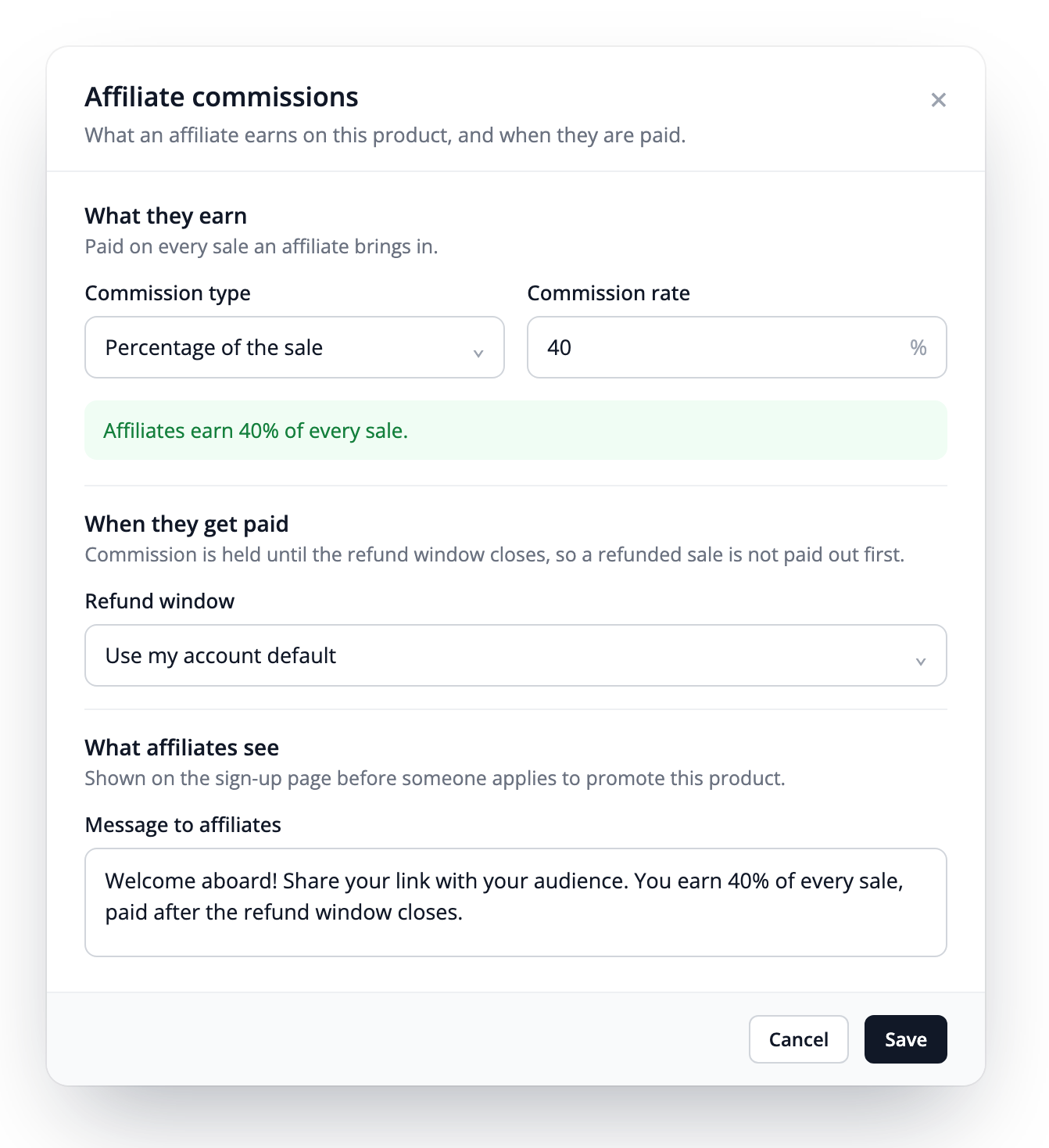
  • Percentage of the sale or a fixed amount
  • Renewals, your choice: decide whether affiliates also earn when a subscription renews
  • Custom commission for one affiliate, higher or lower than the product's standard rate
  • Order bumps included: commission is worked out on the whole order
  • Coupons respected: commission is on the price actually paid
  • Refund window per product: your account default, your own number of days, or no refunds
  • Message and terms link shown on the affiliate sign-up page
Products → Affiliates → CommissionsAffiliate commissions settings: percentage of the sale, refund window and message to affiliates
Attribution rules

Choose who gets the credit when two affiliates sent the same buyer

Pick one of three rules for each product. FlexiFunnels applies it to every sale.
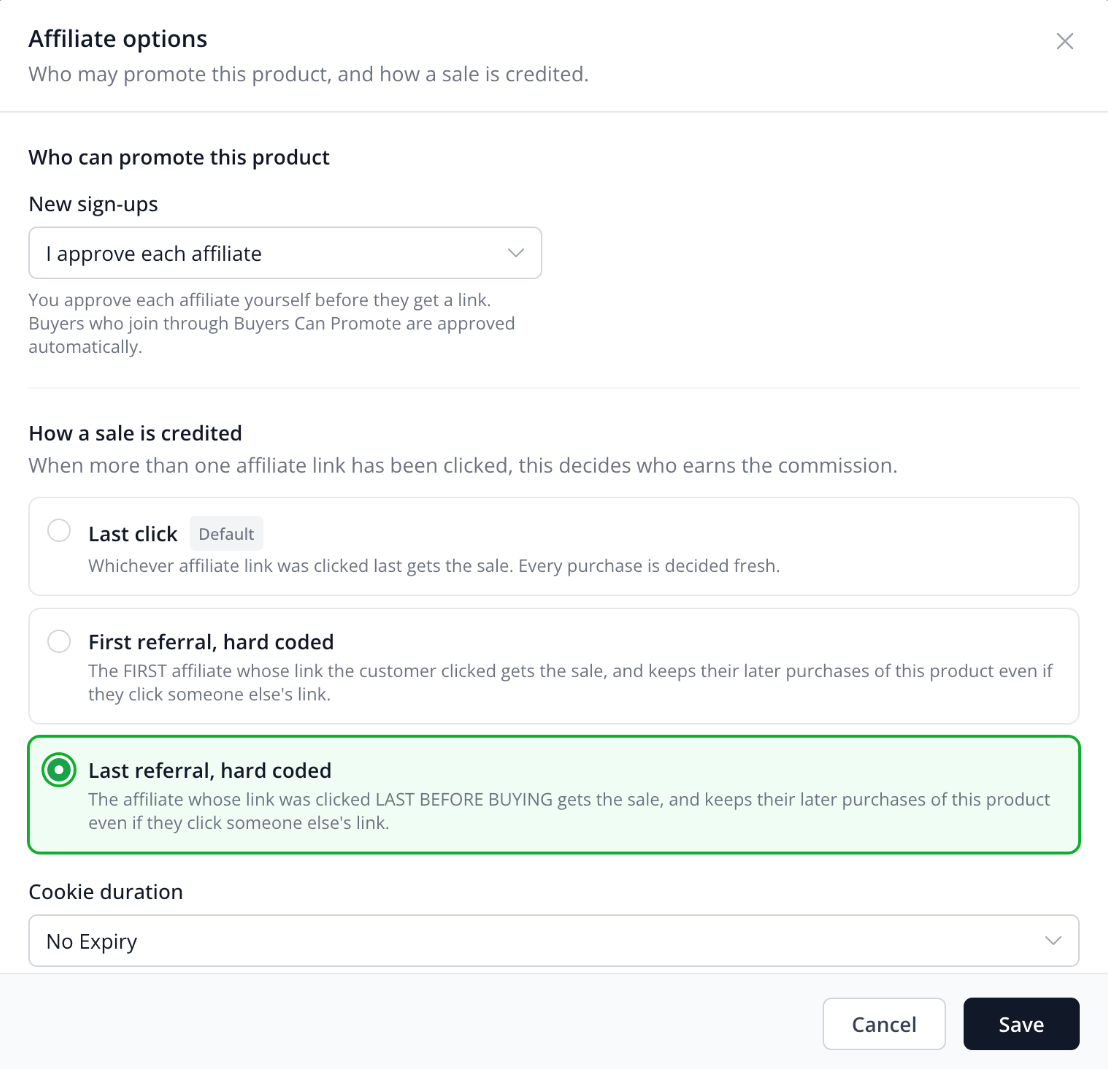
DefaultLast clickThe last affiliate link clicked before buying gets the sale. Every purchase is decided fresh.
Hard codedFirst referralThe first affiliate who brought the customer gets the sale. Whether their later purchases stay with that affiliate is your choice.
Hard codedLast referralThe last link before buying wins. Whether the customer's later purchases stay with that affiliate is your choice.
  • Cookie duration: 1 day up to 1 year, no expiry, or your own number of days
  • New sign-ups: approve each affiliate yourself, or approve automatically
  • Promotion links: several links per product, so affiliates choose the page they send people to
Products → Affiliates → Affiliate OptionsAffiliate options: Last click, First referral hard coded, Last referral hard coded
Customer ties & mapping

Choose whether customers stay with the affiliate who brought them

With the hard-coded rules, a customer is tied to their affiliate by email. The tie holds on another device, after cookies are cleared, and when the customer later clicks another affiliate's link.

DAY 1

Mike buys your course through Asha's link

SAME DAY

Mike is tied to Asha automatically

DAY 20

Mike clicks another affiliate's link and buys your coaching upsell

RESULT

Asha gets the upsell commission

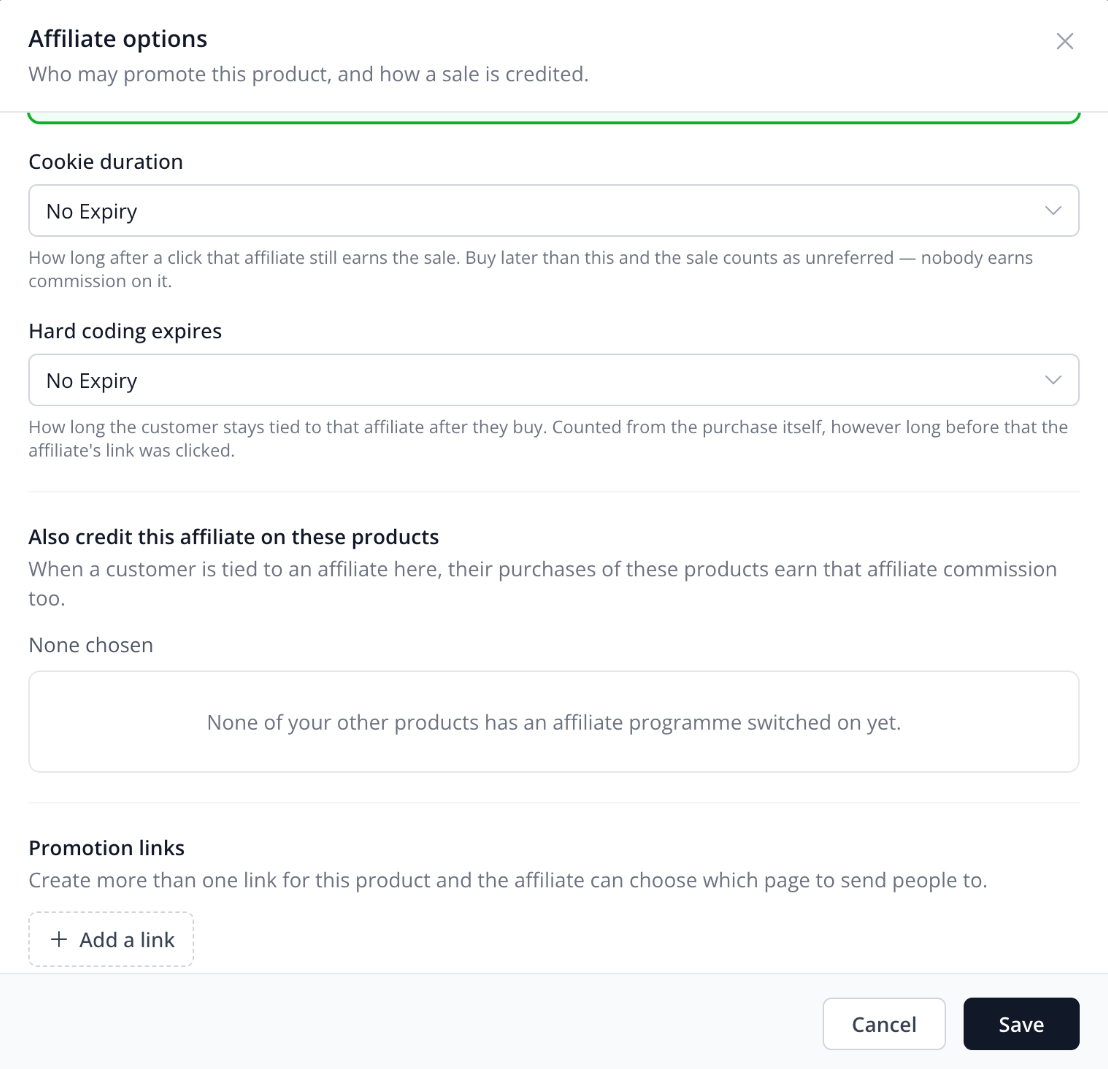
  • Hard coding expiry: how long the tie lasts, from 1 day to no expiry, set separately from the cookie
  • Also credit this affiliate on these products: upsells, renewal products and backend offers pay the affiliate who started the funnel
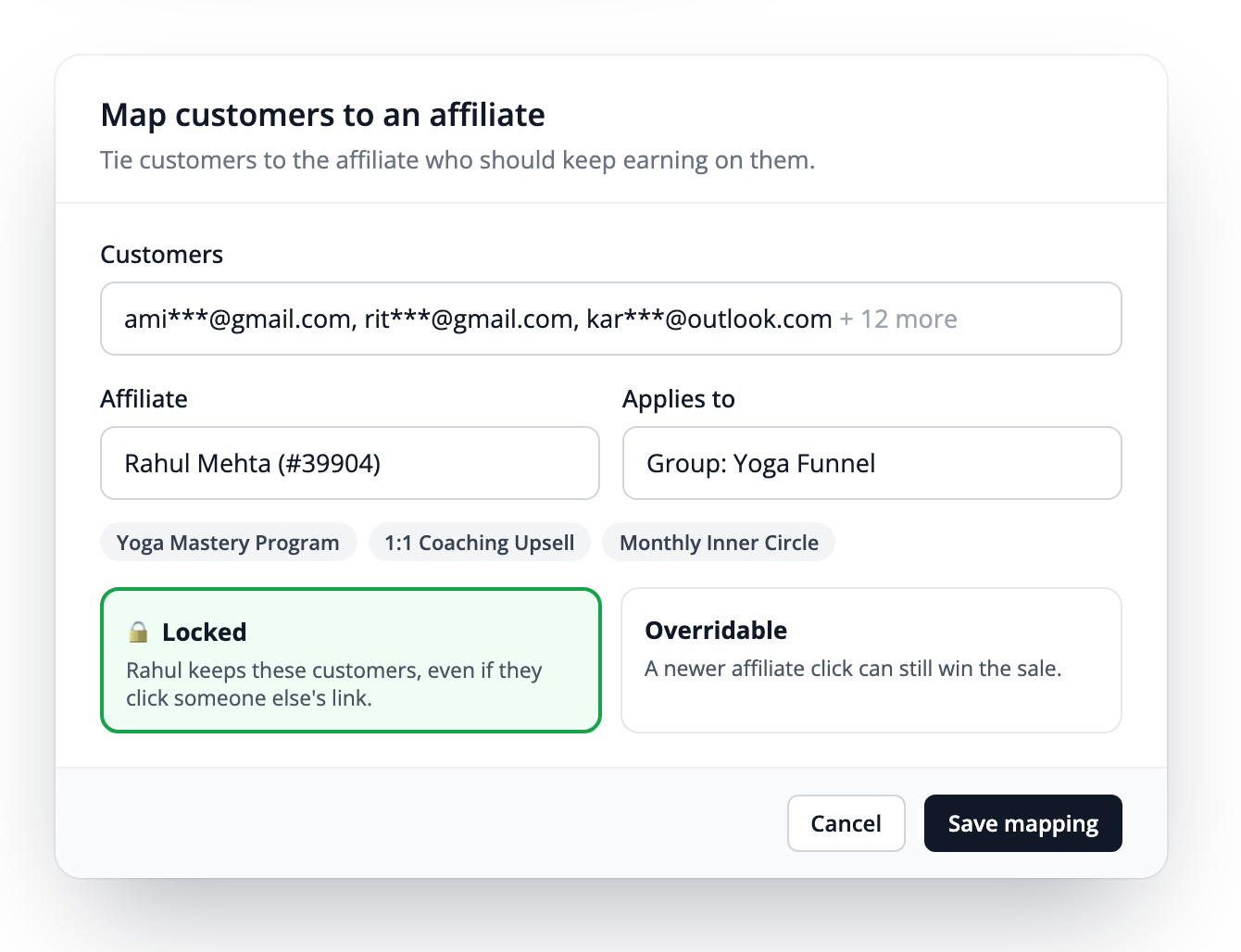
  • Customer mapping: tie customers to an affiliate yourself, one or many at once, locked or overridable
  • Product groups: one mapping covers several products together
Tie length + "Also credit" Hard coding expires and Also credit this affiliate on these products Map customers to an affiliate, locked, across a product group
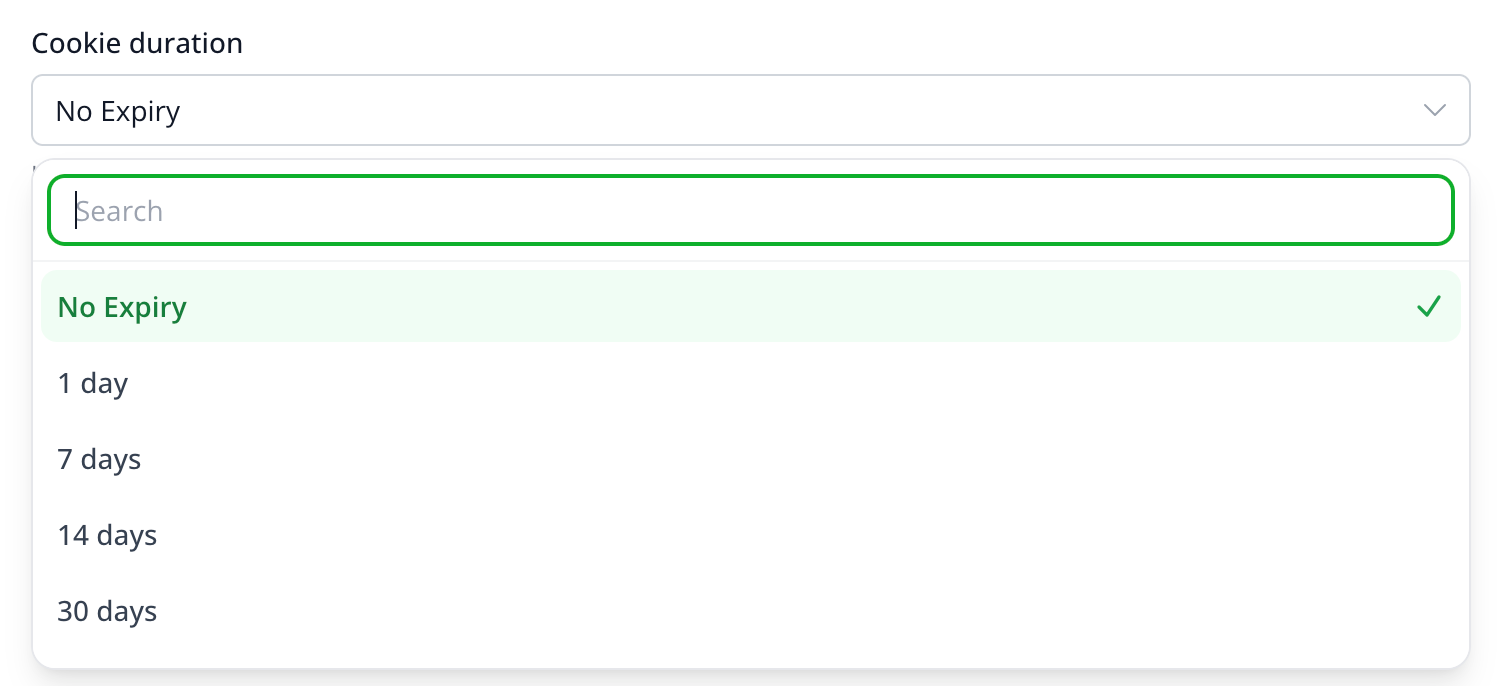
Cookie duration dropdown: No Expiry, 1 day, 7 days, 14 days, 30 days and more
Cookie duration: No Expiry, 1, 7, 14, 30, 60, 90 or 180 days, 1 year, or custom
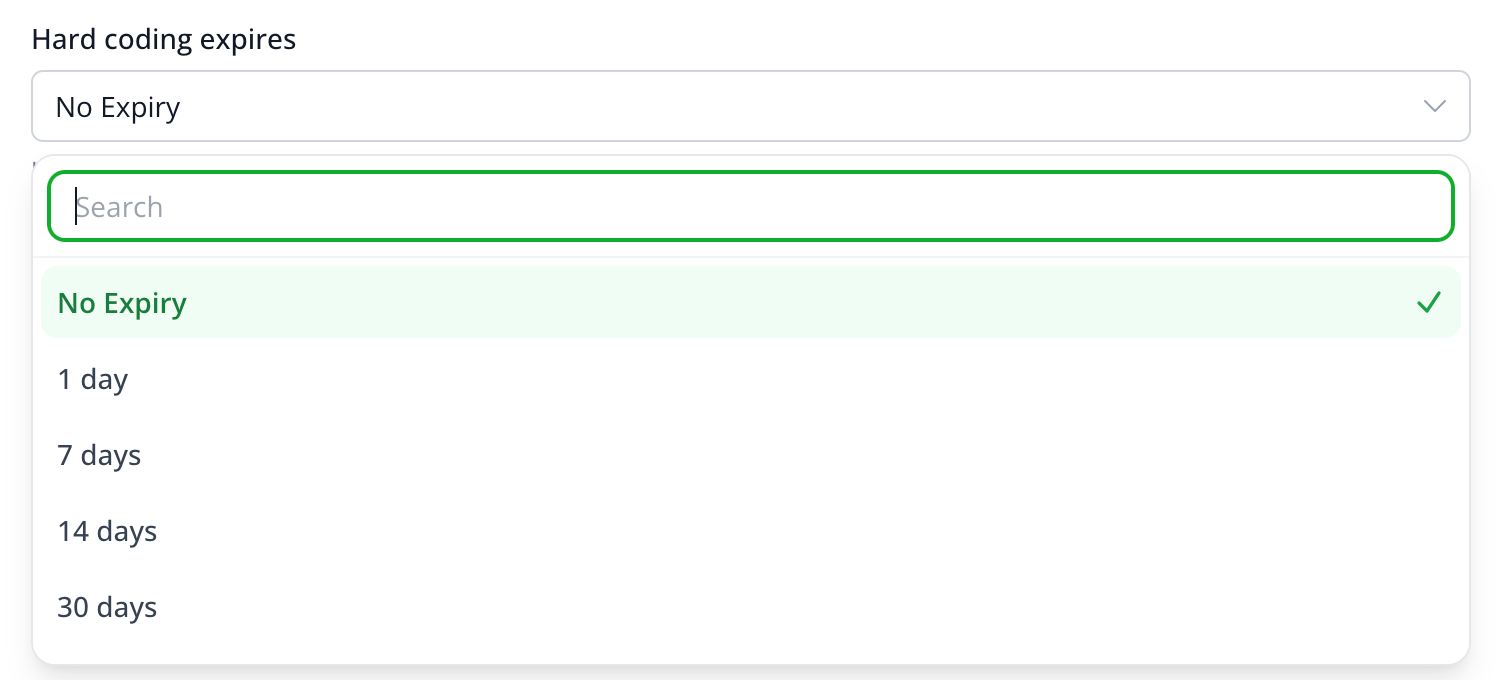
Hard coding expires dropdown: No Expiry, 1 day, 7 days, 14 days, 30 days and more
Hard coding expires: how long the customer stays tied, from 1 day to no expiry
Buyers Can Promote

Turn course, community and membership buyers into affiliates

Choose which products a product's buyers can promote. They see a "Refer & Earn" page inside the member area they already log into, with a ready-made link for each one.
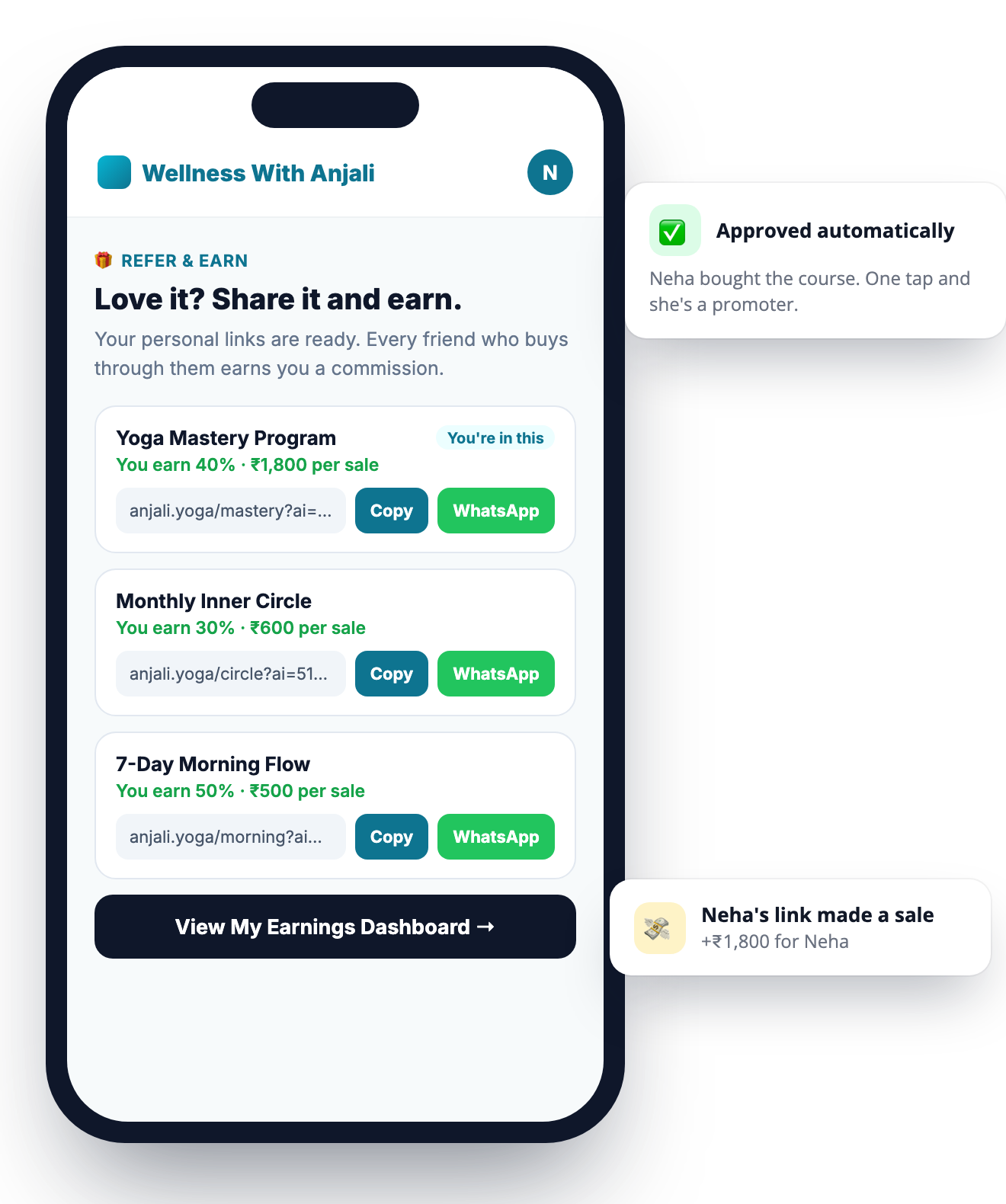
  • Approved automatically: a buyer's link earns from the first share
  • The product they bought is listed first, followed by any other products you choose
  • "View My Earnings Dashboard" opens their affiliate dashboard with no second login
  • Pay no commission when a past buyer buys again, as an optional switch per product
Member area Refer and Earn page with sharing links and View My Earnings Dashboard button
Payouts

See what you owe, and when it becomes payable

Commission is held until each sale's refund window closes, then it moves to "Ready to pay". You pay your affiliate directly and record the payment in FlexiFunnels.
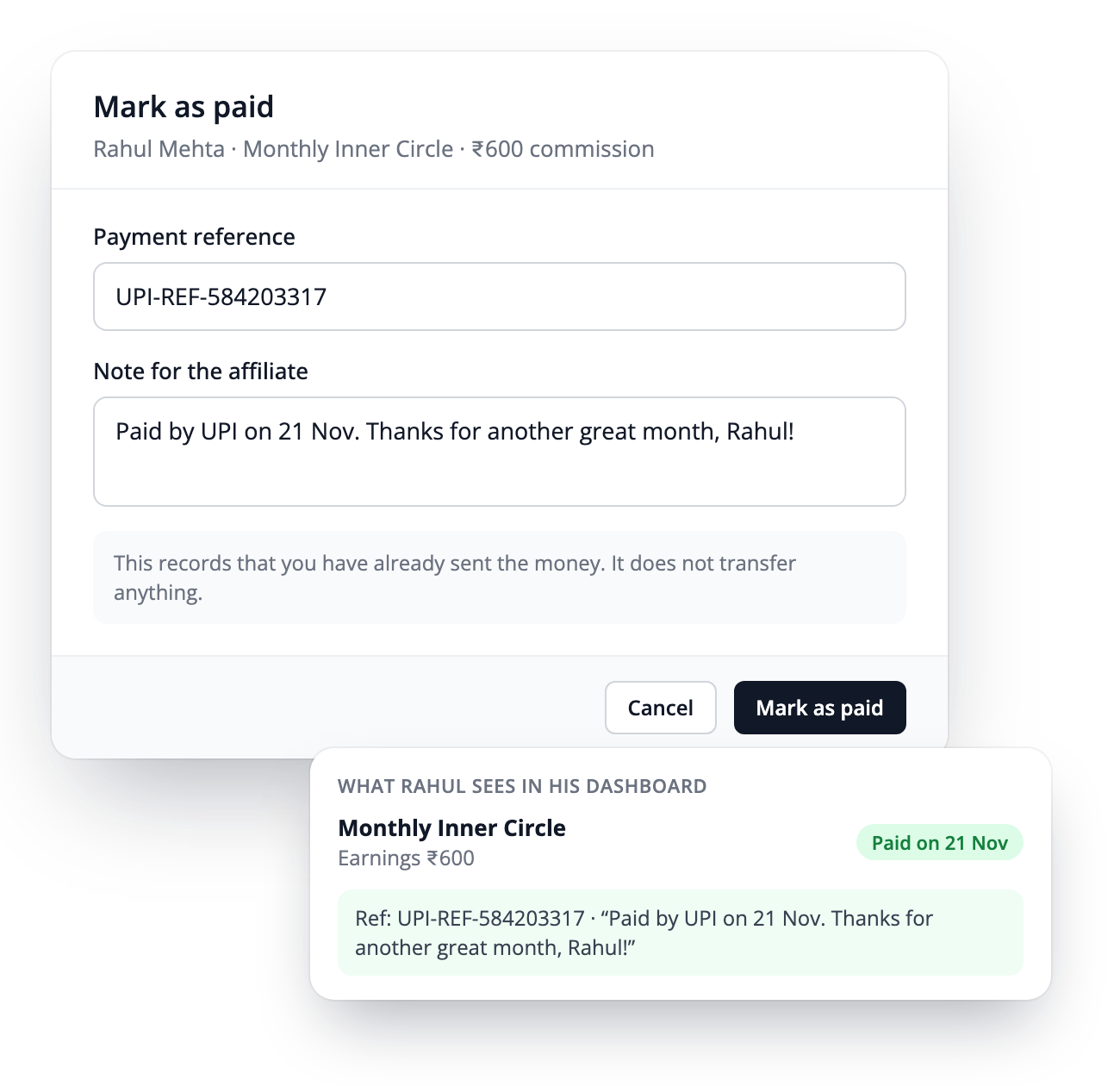
  • Sales list by status: in refund window, ready to pay, on hold, paid
  • Mark as paid with a payment reference and a note, both shown to the affiliate
  • Hold any commission you want to check first
  • Release after a set number of sales, in Payout Rules
  • Totals per currency and CSV download
  • Proper KYC and the affiliate's preferred payment details are collected and passed to you, so you know exactly where to send the money
FlexiFunnels does not move or hold the money. You pay your affiliates your way (bank, UPI, PayPal, Wise) and FlexiFunnels keeps the record for both of you.
Mark as paid with a payment reference and a note, and what the affiliate sees
For your affiliates

Every affiliate gets their own dashboard

Affiliates log in to a FlexiFunnels dashboard with their links, sales, earnings and payout status. They don't need to message you to ask.
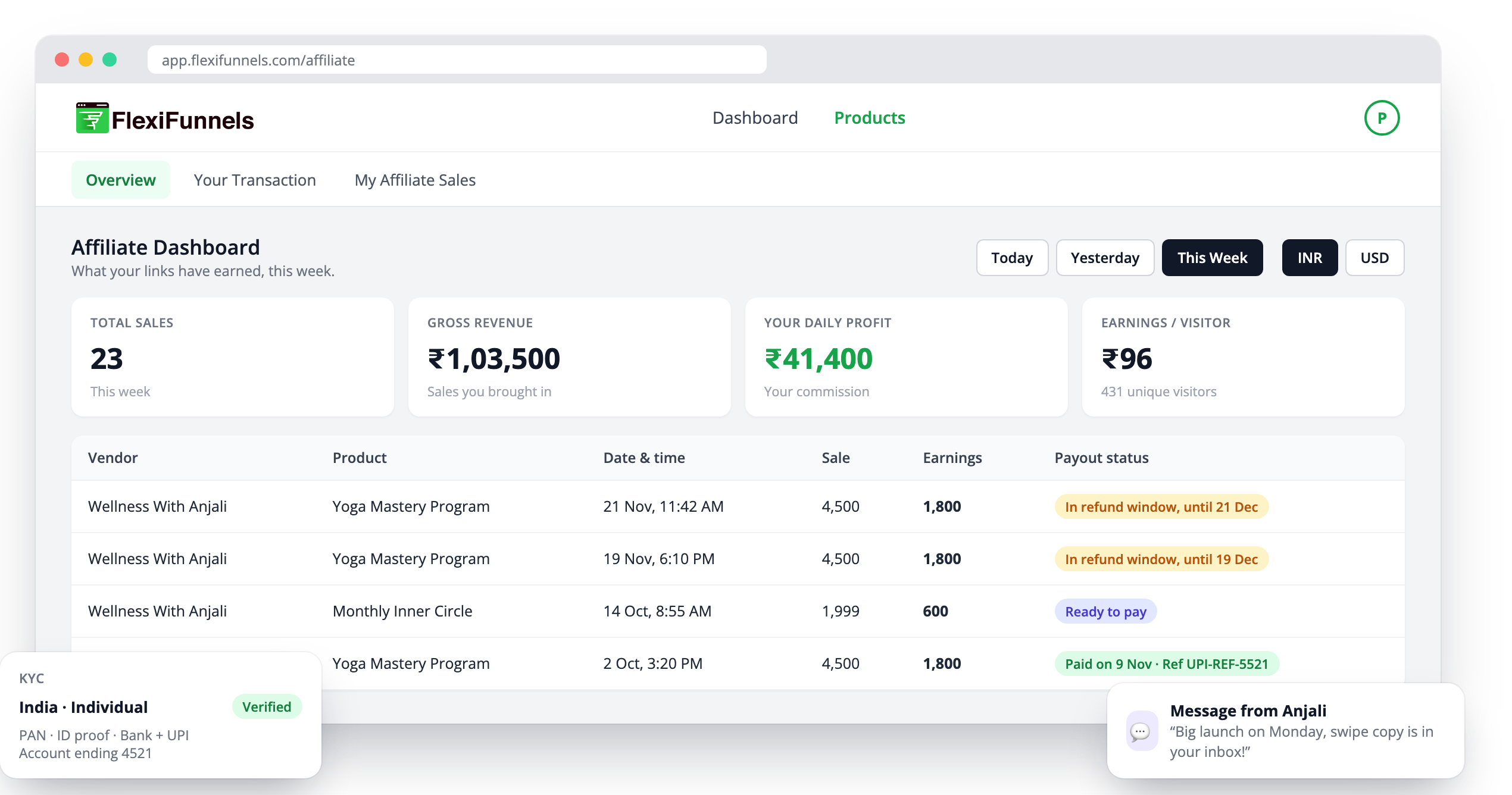
  • Overview: sales, revenue, earnings and visitors for today, yesterday or this week
  • Transactions: every sale with its payout status, reference and your note
  • Proper KYC for India, the US and other countries, individuals and companies, with their preferred payment details passed to you
  • Messages between you and your affiliates, with in-app and email alerts
  • Sign-up page per product with price, commission and your terms, on any screen
Affiliate dashboard with sales, earnings and payout status for each sale
Controls

Built-in rules that keep the numbers clean

Buyers, affiliates and you see the same record of every sale.
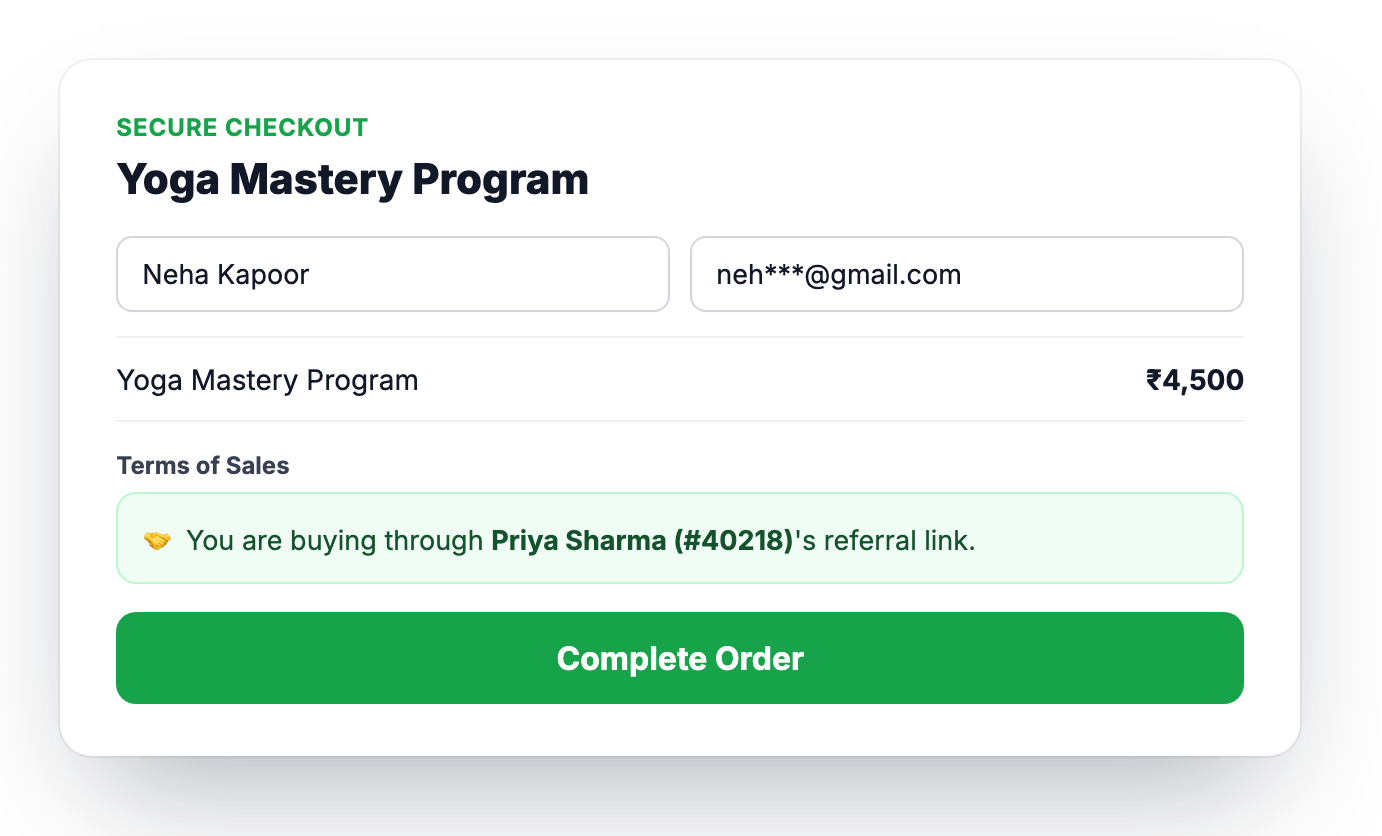
  • Referral line on checkout: "You are buying through Priya's referral link"
  • No self-commission: an affiliate buying through their own link earns nothing
  • Revoke access per product; the link stops earning from that moment
  • Invalid links ignored: a broken or unapproved link never replaces a valid click
  • Tax notice on both sides: amounts are before tax, and tax is between you and your affiliate
Checkout showing You are buying through Priya Sharma's referral link
Full feature list

All the features at a glance

💰

% or fixed commission

Set per product.

⭐

Custom commission

A different rate for an individual affiliate.

🔄

Renewal commission

Your choice: pay affiliates on subscription renewals too.

🎯

3 attribution rules

Last click, first referral or last referral, hard coded.

⏱️

Cookie & hard coding expiry

How long a click counts, and how long a customer stays tied.

🔁

Also credit

Credit the affiliate on upsells and backend offers.

🗂️

Customer mapping

Locked or overridable, one or many, across product groups.

🔗

Promotion links

Several links per product for affiliates to choose from.

🎁

Buyers Can Promote

Refer & Earn inside your member area.

✋

Approve, deny, revoke

Per product, or approve automatically.

🛡️

Refund window

Account default or per product.

✅

Mark as paid & Hold

With payment reference and note.

🔢

Release after N sales

Pay only after a set number of sales.

🚫

Repeat-buyer rule

Optional: no commission when a past buyer buys again.

📊

Performance

Affiliates ranked by the revenue they bring.

💬

Messages

Vendor ↔ affiliate, with email alerts.

🪪

KYC & payment details

Proper KYC, with preferred payment details passed to you.

🌍

Multi-currency

Commissions recorded in the sale's currency.

📥

CSV exports

Sales and payouts, for you and your affiliates.

🤖

FlexiFunnels MCP

Do all of this from your AI assistant too.

Works with

Works with what you already sell on FlexiFunnels

🛒

One-time productsDigital products, workshops, services and programs.

🎓

Courses, communities, membershipsPlus Buyers Can Promote for their members.

🔄

SubscriptionsCommission on the first payment, and on renewals if you choose.

➕

Order bumps and couponsCommission on the full order, after any discount.

🌍

Multiple currenciesEach commission recorded in the currency of its sale.

🌐

Your own domainKeep the sales page and checkout on the same domain.

Built in

Separate affiliate software vs FlexiFunnels

Separate affiliate tools sit outside your checkout and your member area.

What you needSeparate affiliate softwareFlexiFunnels Affiliate Management
Connected to your checkout✕Scripts and integrations to set up✓Built in, nothing to connect
Buyers become affiliates✕They sign up somewhere else✓Refer & Earn inside your member area
Renewals and later purchases stay with the right affiliate✕Depends on the tool✓Hard-coded ties and customer mapping
Commission held until the refund window closes✕Depends on the tool✓Refund window per product
KYC for Indian and international affiliates✕Rarely✓India, US and other countries
Same login as your pages, courses and funnels✕Another login and another tool✓One account
🤖 FlexiFunnels MCP

All of this can also be done through the FlexiFunnels MCP

Connect FlexiFunnels to your AI assistant and manage your affiliate program by simply asking: switch it on for a product, set the commission and the attribution rule, and check your affiliates and sales.

Switch on affiliates for my Yoga Mastery Program. 40% commission, last referral hard coded, 30-day cookie.
Done. Affiliates now earn 40% on Yoga Mastery Program. Sales are credited to the last referral and hard coded, with a 30-day cookie. Your affiliate sign-up link is ready to share.
Which affiliates are ready to be paid?
3 affiliates have commission ready to pay, after the refund window closed. Here is the list…
FAQ

Questions answered

Where do I find Affiliate Management?

Two places. Each product has an Affiliates section where you switch the program on and set commissions and rules. The Affiliates menu at the top of your account has seven tabs: My Affiliates, Products, Sales, Customer Mapping, Performance, Customers and Payout Rules.

Do I need separate affiliate software?

No. Affiliate Management is part of FlexiFunnels and works with your existing pages, checkout, courses and memberships.

How do affiliates join?

Each product has its own affiliate sign-up link. You can also add affiliates yourself, or approve an existing affiliate for more products. Choose to approve each one or approve automatically. Buyers of your courses, communities and memberships can join from their member area.

Two affiliates sent the same buyer. Who gets the commission?

It depends on the rule you choose for the product: Last click, First referral (hard coded) or Last referral (hard coded). With the hard-coded rules the customer stays tied to that affiliate for the hard coding expiry you set.

How are affiliates paid?

Commission is held until the sale's refund window closes, then it shows as "Ready to pay". You pay the affiliate directly, then click "Mark as paid" and add a reference and a note. The affiliate sees the payment in their dashboard. FlexiFunnels does not move or hold the money.

Do affiliates earn on subscription renewals?

That is your choice. You decide whether affiliates earn only on the first payment, or on renewals too.

Can an affiliate earn on their own purchase?

No. A purchase through an affiliate's own link with their own email earns no commission.

Do order bumps and coupons count?

Yes. Commission is worked out on the whole order including any order bump, and on the price actually paid after a coupon.

What KYC do affiliates fill in?

It depends on their country: PAN and an identity proof in India, SSN or EIN with a W-9 in the United States, and a tax number with a photo ID elsewhere. Companies add their company details. Their preferred payment details (bank, UPI, PayPal or Wise) are passed to you for payouts. FlexiFunnels shows commission before tax; any tax deduction is between you and your affiliate.

Does it work in more than one currency?

Yes. Each commission is recorded in the currency of its sale, and totals are shown separately for each currency.

Can I manage it through the FlexiFunnels MCP?

Yes. Everything on this page can also be done through the FlexiFunnels MCP, from the AI assistant you connect to your FlexiFunnels account.

Does it work on my own domain?

Yes. Keep your sales page and checkout on the same domain so every affiliate sale is tracked.

Launch your affiliate program inside FlexiFunnels

Commissions, attribution rules, payouts and a dashboard for every affiliate, in the same account as your pages, checkout and courses.

Get Started With FlexiFunnels Now →Trusted by 23,000+ businesses